
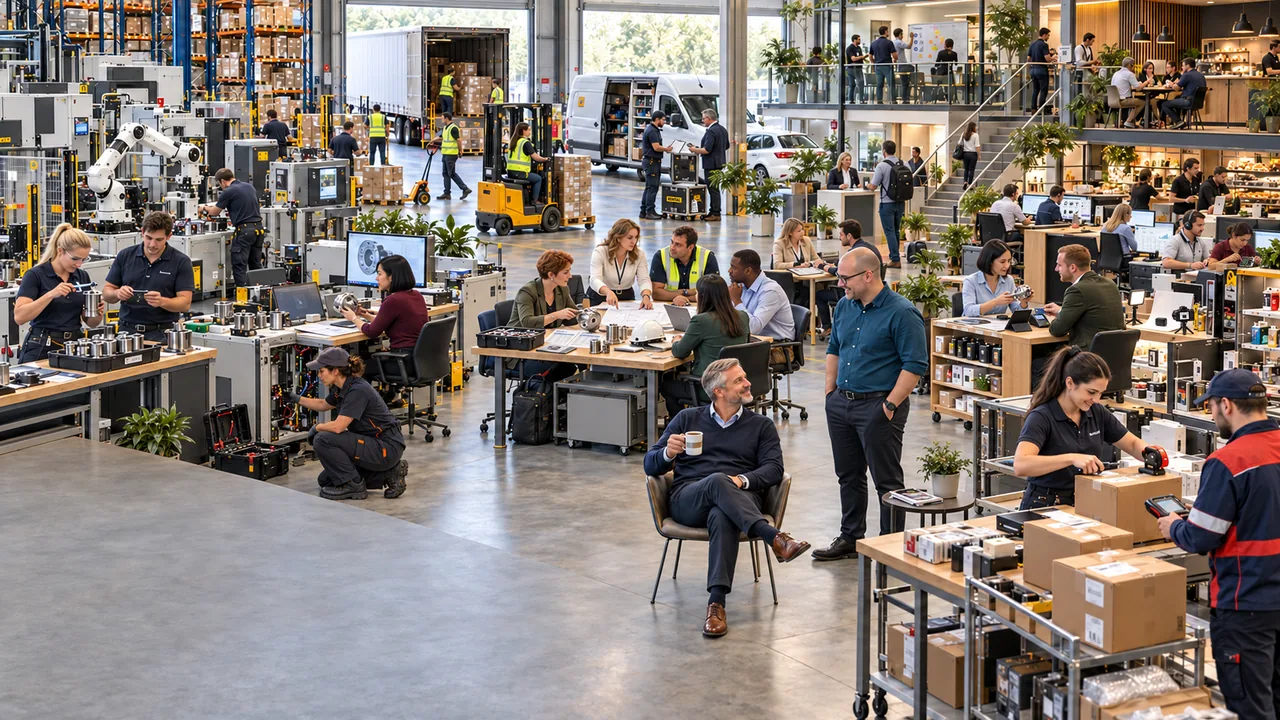
A bustling modern business: manufacturing, logistics, offices and retail share one space. A relaxed business owner sits with a coffee in the foreground.

Business / Odoo

Odoo for your whole business.

People. Processes. One system.

All / 30

One connected business

A whole working day. One shared picture.

Follow the people, products and decisions across 30 business areas. Choose an area to see the process, the Odoo applications and the work Odexer connects.

Business → Application → Platform

Select an area in the picture or use the menu.

BUSINESS FIRST. THREE CONNECTED LAYERS.All services →
Services map · Odoo
BUSINESS FIRST. THREE CONNECTED LAYERS.All services →

Business first

Area by area.

The picture shows one busy day. Goods arrive, machines run, orders ship, people are hired, the books are closed. Every part of it is something Odoo runs, and something Odexer builds, connects and keeps running.

These areas are examples, not the limit. Which applications and features are available depends on the Odoo edition and version you run.

30 areas

01 / 30Purchase & suppliers

The right deal, before delivery.

Compare supplier quotes, prices and delivery dates beside the actual samples. Approve the purchase, receive the goods and match the vendor bill; arrange dropshipping when it fits.

  1. Compare
  2. Approve
  3. Purchase
  4. Receive
  • Purchase
  • Approvals
  • Documents
  • Sign
02 / 30Receiving

Expected. Checked. Received.

Match arriving goods to a purchase order, scan the delivery and record quantities. Route products through quality checks before they enter available stock.

  1. Receive
  2. Scan
  3. Check
  4. Put away
  • Inventory
  • Barcode
03 / 30Warehouse & traceability

Everything in its place.

Locate stock by warehouse, lot and serial number. Follow expiry dates, inventory counts and consignment ownership from receipt to delivery.

  1. Locate
  2. Trace
  3. Count
  4. Deliver
  • Inventory
  • Barcode
04 / 30Internal logistics

The next move is clear.

Replenish locations, transfer stock between warehouses and keep production supplied. Each barcode scan connects the next physical move with the right record.

  1. Replenish
  2. Scan
  3. Transfer
  • Inventory
  • Barcode
05 / 30Manufacturing & Shop Floor

From plan to product.

Connect bills of materials, capacity and work orders to the shop floor. Build to stock or to a confirmed order, coordinate subcontractors and collect machine data through IoT.

  1. Plan
  2. Build
  3. Check
  4. Complete
  • Manufacturing
  • Shop Floor
  • IoT
06 / 30Product development & PLM

A better idea. Built in.

Turn a prototype into a controlled product revision. Review engineering changes, approve the right bill of materials and release it to production with its documents.

  1. Design
  2. Revise
  3. Approve
  4. Release
  • PLM
  • Documents
  • Manufacturing
07 / 30Quality

Right, down to the detail.

Turn measurements into quality checks. Record failures, trace affected lots and follow corrective actions before a defect travels further.

  1. Measure
  2. Flag
  3. Resolve
  • Quality
08 / 30Equipment maintenance

Keep the day moving.

Plan preventive maintenance and respond to breakdowns. Give technicians the equipment history and spare parts they need to bring the machine back into service.

  1. Schedule
  2. Maintain
  3. Resume
  • Maintenance
09 / 30Fleet management

Keep the fleet ready. Understand its cost.

Bring vehicle records, drivers, contracts and service history into a clear operating picture. Vehicle administration supports the business; dispatch and live telematics require a deliberate integration scope.

  1. Register
  2. Assign
  3. Maintain
  4. Review
  • Fleet
10 / 30Field service

The right person. Ready for the visit.

Plan on-site work with the customer, the task and the technician in view. Record time and materials, complete the visit and pass a clear account of the work to invoicing.

  1. Plan
  2. Prepare
  3. Visit
  4. Complete
  • Field Service
  • Planning
  • Timesheets
11 / 30Returns & product repairs

A problem, properly resolved.

Bring the original order into the support conversation. Arrange a return, repair the customer’s product and follow the case through replacement or refund.

  1. Request
  2. Return
  3. Repair
  4. Resolve
  • Repairs
  • Helpdesk
  • Inventory
12 / 30Rental & handover

Out on a job. Back on time.

Reserve rental equipment, sign the agreement and check it out with a handover record. Track availability, rental charges, return dates and late returns.

  1. Reserve
  2. Sign
  3. Collect
  4. Return
  • Rental
  • Sign
  • Sales
13 / 30B2B sales & CRM

Beyond the first conversation.

Turn a lead into a quote with customer pricelists and payment terms. Confirm the order and trigger procurement or manufacturing when the product is made to order.

  1. Lead
  2. Quote
  3. Order
  4. Deliver
  • CRM
  • Sales
  • Contacts
14 / 30Subscriptions & membership

A relationship that keeps growing.

Connect recurring contracts, renewal dates and membership levels. Manage recurring invoices and, where needed, regular physical deliveries from the same customer relationship.

  1. Subscribe
  2. Invoice
  3. Deliver
  4. Renew
  • Subscriptions
  • Membership / Partnership
15 / 30Retail & POS

A good experience sells.

Serve shoppers with live stock, contactless payment, loyalty rewards and gift cards. Keep in-store returns and consignment stock connected to the sale.

  1. Choose
  2. Pay
  3. Earn rewards
  4. Return
  • Point of Sale
  • Sales
  • Inventory
16 / 30Restaurant, POS & Lunch

Good service. Every table.

Connect tables, kitchen orders and payments. Let guests order by QR code, keep ingredients in stock and help the team organize lunch.

  1. Order
  2. Prepare
  3. Serve
  4. Pay
  • Point of Sale
  • Lunch
  • Inventory
17 / 30eCommerce, website & customer portal

Your business. Open online.

A storefront for B2C and B2B, with customer-specific prices and useful product content. Customers can order, pay online and follow orders and invoices in their portal.

  1. Browse
  2. Order
  3. Pay
  4. Track
  • Website
  • eCommerce
  • Blog
  • Live Chat
18 / 30Dispatch & collection

From a click to their doorstep.

Pick and pack orders, print carrier labels and follow tracking through delivery. Keep Click & Collect ready for pickup and recurring subscription deliveries on schedule.

  1. Pick
  2. Pack
  3. Ship / Collect
  • Inventory
  • Barcode
  • Sales
  • eCommerce
19 / 30Helpdesk & communication

From question to resolution.

Keep calls, WhatsApp and live chat in the customer context. Assign the ticket, agree the next step and connect the conversation to a return, repair or refund.

  1. Ask
  2. Assign
  3. Resolve
  • Helpdesk
  • Phone / VoIP
  • WhatsApp
  • Live Chat
  • Contacts
20 / 30Recruitment & people

Good people. A good start.

Bring referrals and applications into an organized hiring process. Review the CV, run interviews and carry the employee’s information into onboarding and skills development.

  1. Apply
  2. Interview
  3. Onboard
  • Recruitment
  • Employees
  • Referrals
21 / 30Attendance, time off & payroll

A working day that adds up.

Connect shift planning, clock-in, overtime and approved time off. Keep the working day and payroll aligned with the people doing the work.

  1. Plan shifts
  2. Clock in
  3. Approve
  4. Payroll
  • Attendances
  • Time Off
  • Payroll
  • Planning
  • Employees
22 / 30Learning & development

Know-how that travels.

Turn a workshop into shared skills, courses and useful answers. Support appraisals and development with a knowledge base, forum and employee learning history.

  1. Learn
  2. Share
  3. Apply
  4. Review
  • Appraisals
  • eLearning
  • Knowledge
  • Forum
  • Employees
23 / 30Front desk & appointments

A welcome that works.

Book the meeting, welcome the visitor and notify the right person. Appointments and calendars keep everyone ready for the conversation.

  1. Book
  2. Welcome
  3. Meet
  • Frontdesk
  • Appointments
  • Calendar
24 / 30Finance & documents

The numbers make sense.

Follow invoices through payment and bank reconciliation. Manage employee expenses, reimbursement and client reinvoicing, budgets, assets, stock valuation and reporting across currencies.

  1. Invoice
  2. Pay
  3. Reconcile
  4. Report
  • Accounting
  • Invoicing
  • Expenses
  • Documents
  • Spreadsheet
  • Sign
  • ESG
25 / 30Projects & team work

Turn the plan into progress.

Connect tasks, shared knowledge and timesheets to milestones and client billing. Compare project revenue with costs, including expenses charged back to the customer.

  1. Plan
  2. Track
  3. Invoice
  4. Review
  • Project
  • Timesheets
  • Discuss
  • To-do
  • Knowledge
26 / 30Marketing & campaigns

The next customer starts here.

Create product content, publish it and connect email, social and SMS campaigns to CRM. Nurture leads and follow conversions from the first message to the sale.

  1. Create
  2. Publish
  3. Nurture
  4. Convert
  • Marketing Automation
  • Email Marketing
  • SMS Marketing
  • Social Marketing
  • Marketing Card
27 / 30Events & community

Bring the right people together.

Invite the audience, register participants and welcome them to a workshop. Connect membership, community conversations, surveys and feedback after the event.

  1. Invite
  2. Register
  3. Meet
  4. Learn
  • Events
  • Surveys
  • Forum
  • Membership / Partnership
28 / 30Management & multiple companies

Many teams. One clear view.

Coordinate companies, branches and teams from a shared overview. Connect intercompany sales and purchases, approve decisions and follow the results across the group.

  1. Coordinate
  2. Approve
  3. Review
  • Planning
  • Dashboards
  • Approvals
  • Spreadsheet
29 / 30AI, Studio & data

Less repetition. More progress.

Use Odoo’s AI features, clean duplicate data and adapt workflows with Studio. Keep automation, access rights and approvals connected to the work people actually do.

  1. Assist
  2. Clean
  3. Automate
  4. Approve
  • AI
  • Studio
  • Data Cleaning
  • Approvals
30 / 30The owner & the Odexer expert

It works. Enjoy your coffee.

The business stays busy. You have the overview and a moment to yourself. An Odexer expert understands the operation and keeps Odoo working with it.

Business · Application · Platform

What Odexer does with Odoo

Odoo can give a business this structure, area by area. Somebody has to build that Odoo for your company, connect it to the systems you already use, and keep it running. That is our work.

We build it in Build & customize. We connect it in Connect. We run it in Run. And when an Odoo already exists and the business cannot rely on it, we take it over in Rescue. All of it, by layer, is on the Services page.

BusinessPeople · Processes · Rules
ApplicationOdoo · Engineering
PlatformInfrastructure · Operations

Start with one area.

Tell us which parts of your business Odoo should run.

When the first area works, the next ones build on it.

Talk to an engineer